Self-serve AI for accounts payable
Finance-grade AI agents
Catch overbillings
and duplicates
before they’re paid.
Sign up today
Works with QuickBooks Online, Sage Intacct and NetSuite. Get started and claim your 800 free tokens.
Pay for what you use. No minimums. Privacy Policy
OpenEnvoy is AI accounts payable software for finance teams. Its AI agents capture, code, and match every invoice, flag duplicates and overbillings, and process your first invoice the same day, with no supplier onboarding. Works with QuickBooks Online, Sage Intacct and NetSuite.
Pay for what you use. No minimums. See pricing
- $3.2B in overbillings caught
- 99.69% capture accuracy
- SOC 2
Trusted by finance teams at


The cost of manual AP
Overpayments hide in plain sight.
Duplicate payments slip through manual review.
Vendors overbill against contract rates and nobody catches it.
The AP team spends its week keying and chasing approvals.
How it works
Every invoice checked before it’s paid.
Capture
Every invoice is read to the line item.
Verify
Matched against POs, contracts, rate cards, and receipts, in any invoice format, with duplicates and overbillings flagged.
Approve and pay
Only exceptions reach a reviewer, and approvals route by delegation of authority.
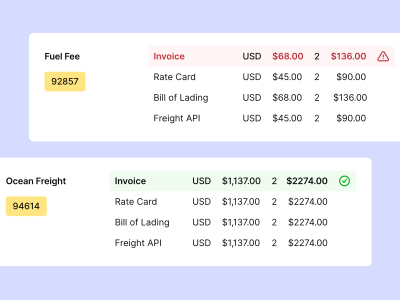
Ask OE is included. Ask about your invoices, spend, and suppliers in plain words and get answers, reports, and charts.
Get started todayProof of performance
Results finance teams can measure.
- Overbillings caught
- $3.2B
- Payments orchestrated
- $25B+
- Touchless invoices
- 84%
- First invoice processed
- Same day
Customers
Leading companies have transformed with OpenEnvoy
“Raney’s was able to digitize AP across 100% of our suppliers in just 60 days. With OpenEnvoy we’ve been able to scale touchless processing without the burden of ‘no PO no Pay’. We’ve been able to shift team members from manual clerical work to proactively disputing overbillings and pursuing other ways to hit the goals of our growing business.”
 Eric Anderson, Co-FounderRaney’s Truck Parts
“The technology changed the work, but it didn’t reduce the importance of the people doing it. Our team spends less time managing process complexity and more time applying judgment, strengthening controls, building relationships with suppliers, and helping the business make smarter decisions. That’s a better experience for our employee-partners and a better outcome for Schreiber.”
 Tim Noonan, EVP and CFOSchreiber Foods
Integrations
Works with your ERP, no disruption
Start free with QuickBooks Online or Sage Intacct in one click, or NetSuite with a guided setup. Microsoft Dynamics 365 connects on Scale, and SAP, Oracle, and Workday connect on Enterprise.
Get started todayPlans
One engine. Three ways to run it.
Essentials
Self-serve. Connect your ERP and process your first invoice today, starting with 800 free tokens.
EssentialsScale
Our experts configure the AI with you on NetSuite, Sage Intacct, or Dynamics 365. Live in under 90 days.
ScaleEnterprise
Freight, VAT, and multi-entity, on SAP, Oracle, and Workday.
Enterprise
Get started
Takes minutes to get started today.
1. Connect
Enter your work email and confirm the code.
2. Verify
Secure your account and accept the agreement.
3. Activate
Set up your workspace.
Interactive demo
See OpenEnvoy verify an invoice.
See OpenEnvoy on your invoices
In 30 minutes, you’ll get:
- A walkthrough of how invoices are captured, coded, and matched
- A view of where duplicates and overbillings get through today
- A plan to connect your ERP and process your first invoice the same day
FAQ
Questions, answered.
What is OpenEnvoy?
AI accounts payable software. OpenEnvoy’s AI agents capture, code, and match every invoice against purchase orders, contracts, rate cards, and receipts, and flag duplicates and overbillings before they’re paid.
Which ERPs does self-serve work with?
QuickBooks Online and Sage Intacct connect in one click, and NetSuite connects with a guided setup from the Integrations page. Essentials also supports SFTP. Microsoft Dynamics 365 connects on Scale, and SAP, Oracle, and Workday connect on Enterprise.
How long does setup take?
Sign up, connect your ERP, and process your first invoice the same day.
How much does it cost?
Start with 800 free tokens, then pay for what you process. No minimums and no seats to count. Unused tokens roll over. See plans and pricing
What is a token?
The unit you buy. Each document you process uses tokens, and one pool covers document processing across OpenEnvoy products.
What do our suppliers have to do?
Keep sending invoices the way they do now. OpenEnvoy handles onboarding and setup.
What is Ask OE?
An AI analyst for your AP data, included in Essentials. Ask in plain words and get answers, reports, and charts in over 200 languages.
How does OpenEnvoy learn our rules?
From your edits. Fix a GL code, an approval path, or a match rule once, and it carries that forward.
Is our data used to train your models?
OpenEnvoy’s AI is trained on OpenEnvoy’s own finance corpus. Inside your workspace it learns from your team’s edits, and that learning stays yours. Customer data is never used to train models for anyone else.
 Gartner Cool Vendor
 G2 High Performer
 SOC 2
 HIPAA
Serious about protecting your cash flow?
Start with 800 free tokens and see what your last quarter of invoices was hiding.